ESP32 & BME280 & LAMP/WAMP Stack Part 2
Overview
So its been a few weeks and I have added some new functionality to my sensor system. The learning path was tedious and fraught with much mental pain. But it works and is better than before.
I have added a microSD Card module to the board, that will backup of the sensor data. The idea behind this was that my home web server tended to go down every now and then { this is a known issue with some old hardware that is being used}. My theory for the card was that I would at least be able to save the data even if the web endpoint was down.
I decided to get a smaller breadboard to hold the components and a microSD Card module as a part of this upgrade.
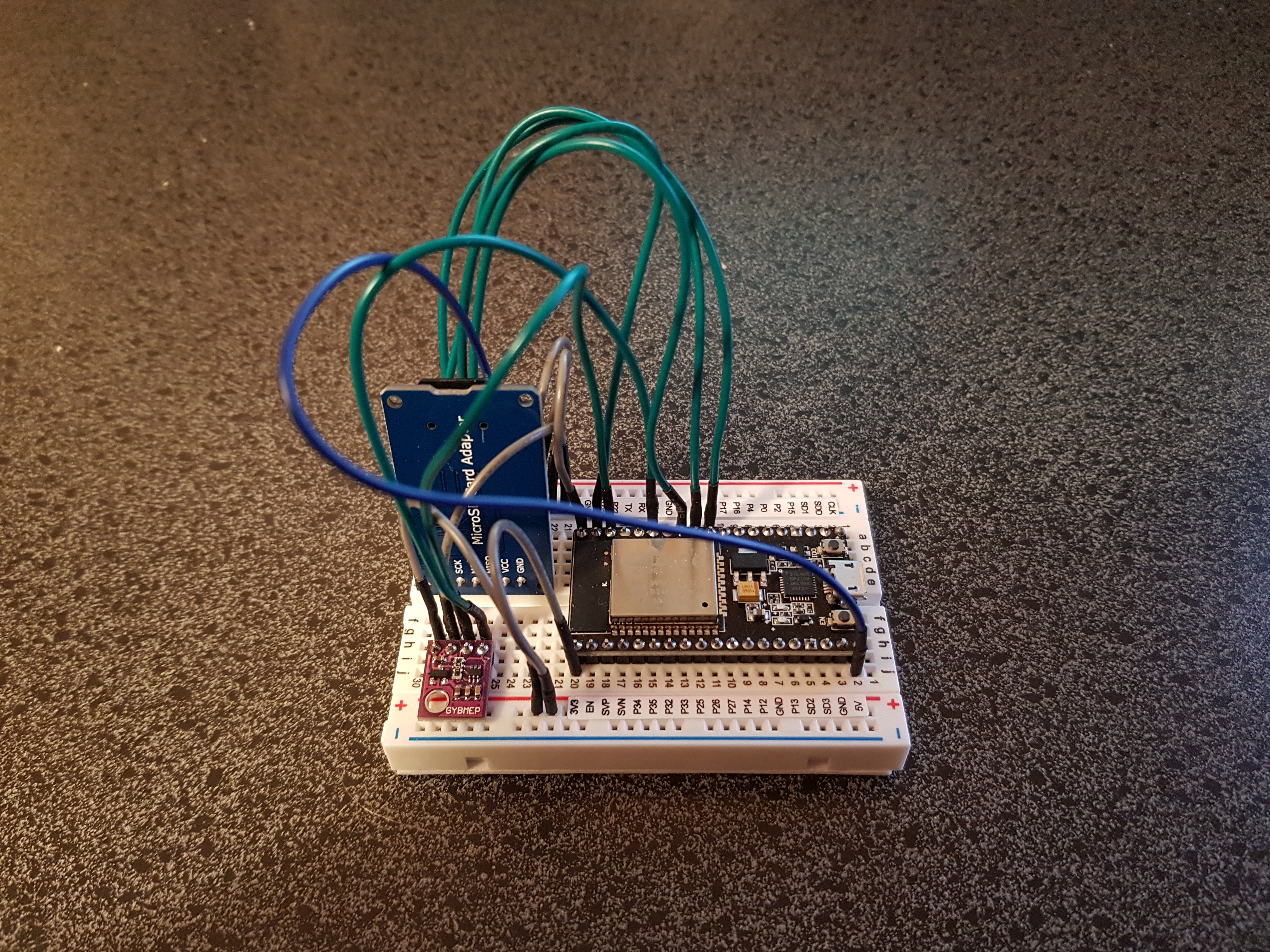
With the extra component came new issues, mostly from poor documentation of the actual microSD Card module. After connecting it up and running a simple sketch to verify it is wired correctly, I kept getting notified that nothing was connected. After a substantial amount of time I discovered that the module requires 5V not the 3.3V I was giving it. It turns out that the module has a voltage regulator on it that drops the 5V to 3.3V, and me feeding it 3.3V caused it to not have enough voltage due to voltage drop in the regulator. This took 6 hours of trying to find similar issues, before discovering a review on Amazon... sigh.
I have decided that as a part of the design process that I am using for this project, I should separating functionality in the program itself even more. To this end I have made classes for each of the "functional modules" which makes the code look cleaner. I have added some more functionality to each class. The current issue is around the ArduinoIDE as it only allows a single file for the "sketch". At some point I will use a better IDE.
So here is the is the new class, I am calling SdCard_Helper Class:
// Libraries for filesystem.
#include <iostream>
#include <fstream>

// Libraries for SD card.
#include "FS.h"
#include "SD.h"

 /**
 * this class encapsulates the SD card and data file functionality.
 */
class SdCard_Helper {
  private:
    const char* DATA_FILE_NAME = "/datafile.dat";

  public:
    /**
     * the constructor.
     * @param long the data pin number being used by the chip.
     */
    SdCard_Helper( long pinNumber ) {
      SD.begin( pinNumber );

      if( SD.begin( pinNumber ) ) {
        Serial.println( "SD Card Mounted" );
      } else {
        Serial.println( "Error: SD Card Mount Failed." );
        return;
      }
    }


    /**
     * this method first confirms that the sd card is still installed, it then
     * manages the writing of the sensor data to the file. It uses a simple CSV format.
     * @param Sensor the sendor that contains all the data.
     * @param String the timestamp of the reading.
     */
    void writeSensorDataToFile( Sensor *sensor, String timeStamp ) {
      if( sensor->testSensor() ) {
        if( SD.cardType() != CARD_NONE ) {
          File dataFile = SD.open( DATA_FILE_NAME, FILE_APPEND );

          if( dataFile ) {
            dataFile.print( sensor->getSensorId() );
            dataFile.print( "," );
            dataFile.print( sensor->getTemperature() );
            dataFile.print( "," );
            dataFile.print( sensor->getHumidity() );
            dataFile.print( "," );
            dataFile.print( sensor->getPressure() );
            dataFile.print( "," );
            dataFile.print( timeStamp );
            dataFile.println( "" );

            dataFile.close();
            Serial.println( "Sensor data saved to file." );
          } else {
            Serial.println( "Error: Cannot open file to write Sensor data to." );
            return;
          }
        } else {
          Serial.println( "Error: No SD card installed." );
          return;
        }
      } else {
        Serial.println( "Error: Sensor is not supplying data." );
        return;
      }
    }
};
Design Rational / Potential Improvements:
- As I want to store all the data on a single file, per sensor I am setting the file name as a private constant.
- The constructor takes the pin number for the data line being used by the esp32. I could not guarantee that it would be the same for all the potential sensors so I decided to pass it to the constructor. I should look into scanning the pins to find an active one...
- The constructor tries to mount the module and serial port notifies if it succeeds or fails. I pondered doing this in the constructor long and hard, coming to the conclusion that for now, it is good enough, but it should be replaced with an exception being thrown in the constructor on failure to mount.
- The writeSensorDataToFile method has too many area's of concern and should be broken down into two of private methods. One to extract the sensor data and the other to actually write it to the file. I also was thinking that I should make a Interface for Sensors to allow me to use other sensors, each sensor class would implement Sensor interface and would be contractually obligated to have the appropriate getters.
- The writing of errors to the serial port is convenient for development but kind of useless for production use.
Here is the new TimeStamp Class:
// Libraries for Network.
#include <WiFi.h>
#include <HTTPClient.h>
#include <NTPClient.h>

/**
 * this class encapsulates the timestamp functionality
 */
class TimeStamp {
  public:
    /**
     * get the current time using the timezone offset.
     * @param long the timezone offset in seconds.
     */
    static String getTimeStamp( long timeZoneOffsetInSeconds ) {
      WiFiUDP ntpUDP;
      NTPClient timeClient( ntpUDP );

      timeClient.begin();
      timeClient.setTimeOffset( timeZoneOffsetInSeconds );

      while( !timeClient.update() ) {
        timeClient.forceUpdate();
      }

      Serial.print( "Sensor Timestamp: " );
      Serial.println( timeClient.getFormattedDate() );

      // sample format 2018-05-28T16:00:13Z
      return timeClient.getFormattedDate();
    }
};
Design Rational / Potential Improvements:
- This class only has a single static method to getTimeStamp from NTP protocol. I decided wrap all the functionality in it.
- There should be some error management here as well if there is no wifi network present. I might just add a network detection mechanism into a private method and have it called before I try to get the time stamp and if there is no network, throw a exception to say hold on.
In regards to the Sensor Class, i have run into an issue with my current design. Which was that I hard coded the SensorId as a const in the application. This means I need to remember to change the ID for each sensor I deploy... not good... So I found a way to get a unique number for each sensor package. And here is the new and improved Sensor Class.
// Libraries for Sensor.
#include <Adafruit_Sensor.h>
#include <Adafruit_BME280.h>

/**
 * this class encapsulates the sensor and the data it generates.
 */
class Sensor {
  private:
    Adafruit_BME280 the_sensor;     // the sensor object.

  public:
    /**
     * the constructor.
     */
    Sensor() {
      testSensor();

      Serial.print( "Sensor Id: " );
      Serial.println( getSensorId() );
    }

    /**
     * check if the sensor is there.
     */
    boolean testSensor() {
      bool status = the_sensor.begin( 0x76 );

      if ( !status ) {
        Serial.println( "Error: Could not find the BME280 sensor!" );
      } else {
        Serial.println( "Sensor: BME280" );
      }

      return status;
    }


    /**
     * generate a unique Id using the Mac Address of the built in wifi network device.
     */
    String getSensorId() {
      byte wifiMacAddress[6];
      WiFi.macAddress( wifiMacAddress );
      return String( wifiMacAddress[ 0 ], HEX ) + String( wifiMacAddress[ 1 ], HEX ) + String( wifiMacAddress[ 2 ], HEX ) + String( wifiMacAddress[ 3 ], HEX ) + String( wifiMacAddress[ 4 ], HEX ) + String( wifiMacAddress[ 5 ], HEX );
    }


    /**
     * get the temperature.
     */
    float getTemperature() {
      return the_sensor.readTemperature();
    }


    /**
     * get the humidity.
     */
    float getHumidity() {
      return the_sensor.readHumidity();
    }


    /**
     * get the barometric pressure.
     */
    float getPressure() {
      return the_sensor.readPressure();
    }
};
Design Rational / Potential Improvements:
- My solution for the unique ID is to get the MAC address of the actual ESP32 and use it as a unique identifier for the sensor. One side of me cringes at doing this a I am going outside my class to get something that is not being directly passed to it. If I passed the value it would be a circular dependency with the WIFI class. The struggle continues.
Conclusions... so far
The next step will be more optimization and error handling, plus I may add some logging onto the SDcard, after all there is enough space on the 8Gb card for data and logs.
Also I am making a box for the sensor using my 3D Printer. I will release the design on Thingiverse.